
LV040-清单文件实例
为方便测试,本节的示例都指定 xml 文件的具体路径。
一、基础示例
清单文件基本框架如下所示:
<?xml version="1.0" encoding="UTF-8"?>
<manifest>
  <remote  name="gitee"
           fetch="git@gitee.com:{namespace}"
           autodotgit="true" /> <!--fetch=".." 代表使用 repo init -u 指定的相对路径 也可用完整路径,example:https://gitee.com/MarineJ/manifest_example/blob/master/default.xml-->
  <default revision="master"
           remote="gitee" /><!--revision 为默认的拉取分支,后续提 pr 也以 revision 为默认目标分支-->

  <project path="repo_test1" name="repo_test1" />  <!--git@gitee.com:{namespace}/{name}.git name 与 clone 的 url 相关-->
  <project path="repo_test2" name="repo_test2" />
</manifest>1. 单个项目仓库
1.1 清单文件
1.2 初始化
repo --trace init --repo-url=https://mirrors.tuna.tsinghua.edu.cn/git/git-repo --repo-rev= -u https://gitee.com/sumumm/repo-manifest-demo.git -b master -m 01-basic/repo-demo.xml【例】
sumu@sumu-vm:~/workspace/test$ repo --trace init --repo-url=https://mirrors.tuna.tsinghua.edu.cn/git/git-repo --repo-rev= -u https://gitee.com/sumumm/repo-manifest-demo.git -b master -m 01-basic/repo-demo.xml
: git --version
Downloading Repo source from https://mirrors.tuna.tsinghua.edu.cn/git/git-repo
: git init --quiet
: git config remote.origin.url https://mirrors.tuna.tsinghua.edu.cn/git/git-repo
: git config remote.origin.fetch '+refs/heads/*:refs/remotes/origin/*'
: git config --get-regexp 'url.*.insteadof'
remote: Enumerating objects: 9447, done.
remote: Counting objects: 100% (5426/5426), done.
remote: Compressing objects: 100% (2808/2808), done.
remote: Total 9447 (delta 5191), reused 2618 (delta 2618), pack-reused 4021
接收对象中: 100% (9447/9447), 3.37 MiB | 14.63 MiB/s, 完成.
处理 delta 中: 100% (6509/6509), 完成.
: git fetch --quiet --progress origin '+refs/heads/*:refs/remotes/origin/*' '+refs/tags/*:refs/tags/*'
repo: Updating release signing keys to keyset ver 2.3
: gpg --homedir . --import 0<|
: git rev-parse --verify 'refs/remotes/origin/stable^{commit}'
: git describe 1afe96a7e997ce7748f066b206a85ac648f7a87c
: git tag -v v2.59
: git update-ref refs/heads/default 'v2.59^0'
: git config branch.default.remote origin
: git config branch.default.merge refs/heads/stable
: git symbolic-ref HEAD refs/heads/default
: git read-tree --reset -u -v HEAD
: git --version
: /usr/bin/python3 /home/sumu/workspace/test/.repo/repo/main.py --repo-dir=/home/sumu/workspace/test/.repo --wrapper-version=2.54 --wrapper-path=/home/sumu/02software/repo_bin/repo -- --trace init --repo-url=https://mirrors.tuna.tsinghua.edu.cn/git/git-repo --repo-rev= -u https://gitee.com/sumumm/repo-manifest-demo.git -b master -m 01-basic/repo-demo.xml

Your identity is: sumu <2038035593@qq.com>
If you want to change this, please re-run 'repo init' with --config-name

Testing colorized output (for 'repo diff', 'repo status'):
  black    red      green    yellow   blue     magenta   cyan     white
  bold     dim      ul       reverse
Enable color display in this user account (y/N)? y

repo has been initialized in /home/sumu/workspace/test1.3 同步项目
repo sync【例】
sumu@sumu-vm:~/workspace/test$ repo sync
Syncing: 100% (1/1), done in 1.508s
repo sync has finished successfully.1.4 目录结构
最终得到的目录结构如下:
sumu@sumu-vm:~/workspace/test$ tree -a -L 2
.
├── git-example
│   ├── .git -> ../.repo/projects/git-example.git
│   ├── main.c
│   └── readme.md
└── .repo
    ├── copy-link-files.json
    ├── manifests
    ├── manifests.git
    ├── manifest.xml
    ├── project.list
    ├── project-objects
    ├── projects
    ├── repo
    ├── .repo_fetchtimes.json
    ├── .repo_localsyncstate.json
    └── TRACE_FILE

8 directories, 8 files.repo/manifests 这个目录的结构如下:
sumu@sumu-vm:~/workspace/test/.repo/manifests$ tree -a -L 2
.
├── 01-basic
│   ├── README.md
│   └── repo-demo.xml
├── .editorconfig
└── .git -> ../manifests.git

2 directories, 3 files会发现这个其实就是我们的 repo-manifest-demo: repo 的清单库 仓库。
2. 多个仓库
这里我们新增一个仓库并设置拉取到本地的仓库名。
2.1 清单文件
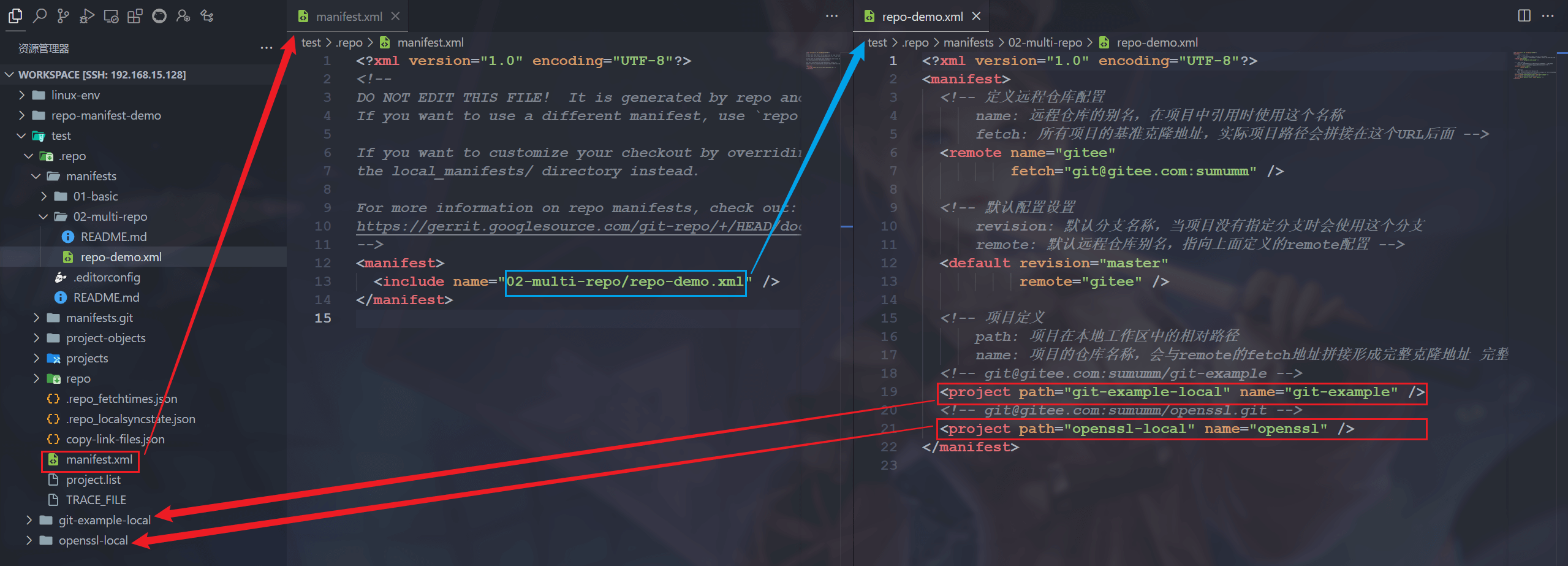
在这个清单文件中我们管理了两个仓库。他们属于同一个 remote:
git@gitee.com:sumumm/git-example.git
git@gitee.com:sumumm/openssl.git2.2 初始化
repo init --repo-url=https://mirrors.tuna.tsinghua.edu.cn/git/git-repo --repo-rev= -u https://gitee.com/sumumm/repo-manifest-demo.git -b master -m 02-multi-repo/repo-demo.xml【例】
sumu@sumu-vm:~/workspace/test$ repo init --repo-url=https://mirrors.tuna.tsinghua.edu.cn/git/git-repo --repo-rev= -u https://gitee.com/sumumm/repo-manif
est-demo.git -b master -m 02-multi-repo/repo-demo.xml
Downloading Repo source from https://mirrors.tuna.tsinghua.edu.cn/git/git-repo
remote: Enumerating objects: 9447, done.
remote: Counting objects: 100% (5426/5426), done.
remote: Compressing objects: 100% (2808/2808), done.
remote: Total 9447 (delta 5196), reused 2618 (delta 2618), pack-reused 4021
接收对象中: 100% (9447/9447), 3.30 MiB | 14.65 MiB/s, 完成.
处理 delta 中: 100% (6514/6514), 完成.

Your identity is: sumu <2038035593@qq.com>
If you want to change this, please re-run 'repo init' with --config-name

repo has been initialized in /home/sumu/workspace/test2.3 同步项目
repo sync【例】
sumu@sumu-vm:~/workspace/test$ repo sync
Syncing: 100% (2/2), done in 1.888s
repo sync has finished successfully.2.4 目录结构
可以看到两个仓库都被 clone 下来了,并且是在 path 参数指定的路径:
2.5 对比提交记录
我们来看一下两个仓库的提交记录,会发现默认都是拉取的最新版本。
2.5.1 openssl.git
远程提交记录:提交 · 苏木/openssl - Gitee.com:

本地的提交记录:
sumu@sumu-vm:~/workspace/test/openssl-local$ git mylog -3
* [sumu] 02f0a9f : 优化代码,将wav头信息打印封装为函数  (HEAD, m/master, gitee/master) (2024-08-14 23:21:18)
* [sumu] e9c1936 : 添加参数解析功能、支持加密和解密  (2024-08-14 23:06:56)
* [sumu] 1a7ff22 : 在C工程中添加Git版本信息打印 (2024-08-14 20:16:54)2.5.2 git-example.git
远程提交记录:提交 · 苏木/git-example - Gitee.com:

本地的提交记录:
sumu@sumu-vm:~/workspace/test/git-example-local$ git mylog -6
* [qidaink] 95f3a07 : feat:添加readme文件  (HEAD, m/master, gitee/master) (2023-06-23 14:47:53)
*   [qidaink] 9d04b8f : feat:C6 合并iss53(冲突已解决)  (2023-06-23 11:12:50)
|\
| * [qidaink] 684f9e8 : feat:C5 结束BUG的修复[issue 53]  (gitee/iss53) (2023-06-23 10:36:42)
| * [qidaink] 2f0500f : feat:C3 修复C1出现的BUG[issue 53]  (2023-06-23 09:23:52)
* | [qidaink] f5a3adf : feat:C4 修复紧急问题  (tag: V2023_06_23_10_06_53-release, gitee/hotfix) (2023-06-23 10:06:53)
|/
* [qidaink] 08ec435 : feat:C2功能开发 (2023-06-23 08:57:24)2.6 看一下远程仓库?
我们下载下来的仓库应该是对应了远程仓库的,我们执行以下命令看一下:
git remote -v【例】
sumu@sumu-vm:~/workspace/test/openssl-local$ git remote -v
gitee   ssh://git@gitee.com/sumumm/openssl (fetch)
gitee   ssh://git@gitee.com/sumumm/openssl (push)

sumu@sumu-vm:~/workspace/test/git-example-local$ git remote -v
gitee   ssh://git@gitee.com/sumumm/git-example (fetch)
gitee ssh://git@gitee.com/sumumm/git-example (push)可以看到,每一个本地仓库为远程仓库取的名字都叫 gitee。
二、加一个命名空间
在 github 或者 gitee 上,我们每个人的仓库都在自己的用户名下,这个可以理解为命名空间(namespace),我们现在要添加一个其他人的的命名空间下的仓库,例如 oschina/repo,需要注意的是,添加其他人的仓库的时候,不能用 ssh 链接,只能用 https,我们对于其他人的仓库是 没有 ssh 权限 的:
https://gitee.com/oschina/repo.git当然这里不仅仅可以使用 gitee 的命名空间,像自己的服务器或者 github、CNB 等,只要有权限拉取,都是没问题的。
1. remote name 相同会怎样?
清单库文件看这里:03-same-name/repo-demo.xml,这个情况属于 remote 中 name 重复,我们可以直接执行下面的命令:
repo init --repo-url=https://mirrors.tuna.tsinghua.edu.cn/git/git-repo --repo-rev= -u https://gitee.com/sumumm/repo-manifest-demo.git -b master -m 03-same-name/repo-demo.xml【例】
sumu@sumu-vm:~/workspace/test$ repo init --repo-url=https://mirrors.tuna.tsinghua.edu.cn/git/git-repo --repo-rev= -u https://gitee.com/sumumm/repo-manifest-demo.git -b master -m 03-same-name/repo-demo.xml
Downloading Repo source from https://mirrors.tuna.tsinghua.edu.cn/git/git-repo
remote: Enumerating objects: 9447, done.
remote: Counting objects: 100% (5426/5426), done.
remote: Compressing objects: 100% (2808/2808), done.
remote: Total 9447 (delta 5192), reused 2618 (delta 2618), pack-reused 4021
接收对象中: 100% (9447/9447), 3.34 MiB | 7.12 MiB/s, 完成.
处理 delta 中: 100% (6510/6510), 完成.
fatal: manifest '03-same-name/repo-demo.xml' not available
fatal: remote gitee already exists with different attributes
================================================================================
Repo command failed: UpdateManifestError
Unable to sync manifest 03-same-name/repo-demo.xml显然这个理报错 remote gitee already exists with different attributes。
2. remote name 不同的情况
2.1 清单文件
当 remote name 不同的时候,这里就需要指明这个仓库要使用哪一个 remote 了,例如:
<!-- git@gitee.com:sumumm/openssl.git -->
<project path="openssl-local" name="openssl" remote="gitee" />

<!-- https://gitee.com/oschina/repo.git -->
<project path="repo-local" name="repo" remote="oschina-gitee" />清单库文件看这里:04-different-name/repo-demo.xml
2.2 初始化
repo init --repo-url=https://mirrors.tuna.tsinghua.edu.cn/git/git-repo --repo-rev= -u https://gitee.com/sumumm/repo-manifest-demo.git -b master -m 04-different-name/repo-demo.xml这一次初始化不会有什么问题了。
2.3 同步项目
repo sync【例】
sumu@sumu-vm:~/workspace/test$ repo sync
Syncing: 100% (3/3), done in 3.465s
repo sync has finished successfully.可以看到这里同步也没什么问题。
2.4 remote 名称
我们看一下现在拉取到本地的几个仓库的远程 remote 名称是什么:
git remote -v【例】
sumu@sumu-vm:~/workspace/test/git-example-local$ git remote -v
gitee   ssh://git@gitee.com/sumumm/git-example (fetch)
gitee   ssh://git@gitee.com/sumumm/git-example (push)

sumu@sumu-vm:~/workspace/test/openssl-local$ git remote -v
gitee   ssh://git@gitee.com/sumumm/openssl (fetch)
gitee   ssh://git@gitee.com/sumumm/openssl (push)

sumu@sumu-vm:~/workspace/test/repo-local$ git remote -v
oschina-gitee   https://gitee.com/oschina/repo (fetch)
oschina-gitee https://gitee.com/oschina/repo (push)会发现和每个仓库指定的 remote 名字一样。
三、alias 的使用
上一个实验做完,我们可以添加别人的仓库了,但是吧,就是每个仓库远程分支别名都是使用的不一样的名字,我们能不能搞成一样的?就跟平时使用 git 的时候一样,全部用 origin?当然也可以啦,这个时候就需要使用 remote 标签的 alias 属性了。
1. 清单库文件
我们在 remote 中添加 alias 属性:
<remote name="gitee"
      alias="origin"
      fetch="git@gitee.com:sumumm" />
<remote name="oschina-gitee"
      alias="origin"
fetch="https://gitee.com/oschina/" />清单库文件看这里:05-alias/repo-demo.xml
2. 初始化
repo init --repo-url=https://mirrors.tuna.tsinghua.edu.cn/git/git-repo --repo-rev= -u https://gitee.com/sumumm/repo-manifest-demo.git -b master -m 05-alias/repo-demo.xml【例】
sumu@sumu-vm:~/workspace/test$ repo init --repo-url=https://mirrors.tuna.tsinghua.edu.cn/git/git-repo --repo-rev= -u https://gitee.com/sumumm/repo-manifest-demo.git -b master -m 05-alias/repo-demo.xml
Downloading Repo source from https://mirrors.tuna.tsinghua.edu.cn/git/git-repo
remote: Enumerating objects: 9447, done.
remote: Counting objects: 100% (5426/5426), done.
remote: Compressing objects: 100% (2808/2808), done.
remote: Total 9447 (delta 5195), reused 2618 (delta 2618), pack-reused 4021
接收对象中: 100% (9447/9447), 3.31 MiB | 8.69 MiB/s, 完成.
处理 delta 中: 100% (6513/6513), 完成.

Your identity is: sumu <2038035593@qq.com>
If you want to change this, please re-run 'repo init' with --config-name

repo has been initialized in /home/sumu/workspace/test可以看到这样初始化是没有问题的。
3. 同步项目
repo sync【例】
sumu@sumu-vm:~/workspace/test$ repo sync
Syncing: 100% (3/3), done in 3.465s
repo sync has finished successfully.可以看到这里同步也没什么问题。
4. 看一下远程仓库?
我们执行:
git remote -v【例】
sumu@sumu-vm:~/workspace/test/git-example-local$ git remote -v
origin  ssh://git@gitee.com/sumumm/git-example (fetch)
origin  ssh://git@gitee.com/sumumm/git-example (push)

sumu@sumu-vm:~/workspace/test/openssl-local$ git remote -v
origin  ssh://git@gitee.com/sumumm/openssl (fetch)
origin  ssh://git@gitee.com/sumumm/openssl (push)

sumu@sumu-vm:~/workspace/test/repo-local$ git remote -v
origin  https://gitee.com/oschina/repo (fetch)
origin https://gitee.com/oschina/repo (push)这样每个远程仓库链接的别名就都一样了。
四、拉取指定版本
1. 清单文件
有的时候我们希望在拉取的时候可以拉取指定版本,这种情况下我么可以在 project 中添加 revision 属性,例如:
<project path="openssl-local" name="openssl" revision="1a7ff22884d28ab7efba583a9d6cc7627b5f42a6"/>清单库文件看这里:06-revision/repo-demo.xml,这里指定 openssl 仓库的版本为 1a7ff22。

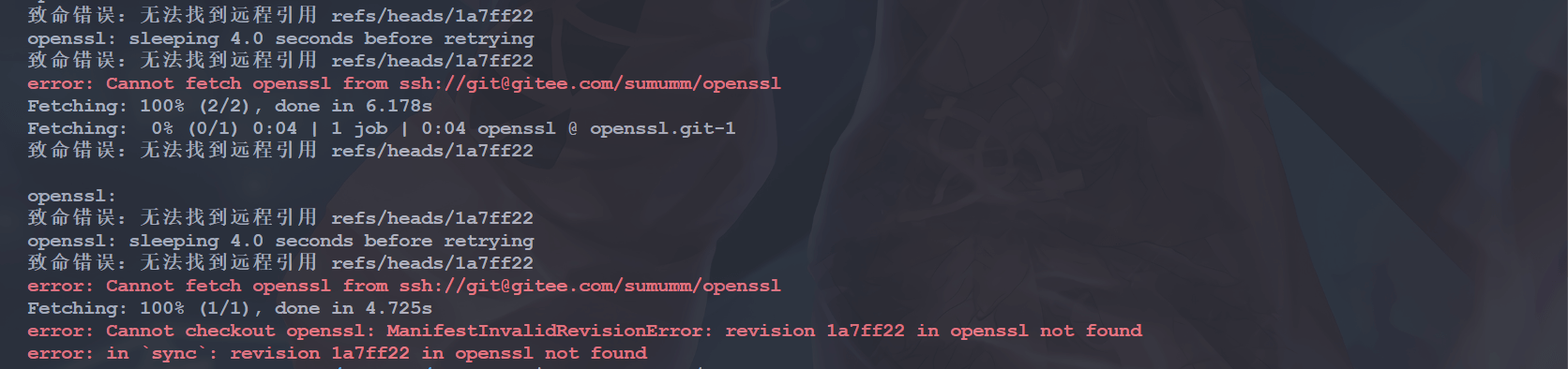
需要注意的是这里不能写简写 1a7ff22, 要写完整的 commid id:1a7ff22884d28ab7efba583a9d6cc7627b5f42a6,否则就可能会出现报错:
2. 初始化
执行以下命令:
repo init --repo-url=https://mirrors.tuna.tsinghua.edu.cn/git/git-repo --repo-rev= -u https://gitee.com/sumumm/repo-manifest-demo.git -b master -m 06-revision/repo-demo.xml3. 同步项目
repo sync4. 看一下提交记录
当成功拉取分支和版本后,我们看一下这个本地的 openssl 仓库的提交记录:
sumu@sumu-vm:~/workspace/test/openssl-local$ git mylog -3
* [sumu] 1a7ff22 : 在C工程中添加Git版本信息打印  (HEAD, m/master) (2024-08-14 20:16:54)
* [sumu] 86a7a3d : 加密解密扩展密钥独立开来、修复警告  (2024-08-14 07:36:00)
* [sumu] 9973f45 : 支持读取并打印44字节WAV头信息 (2024-08-13 07:49:24)可以发现最新版本已经在 1a7ff22 这里了。
五、拉取指定分支
1. 创建一个分支
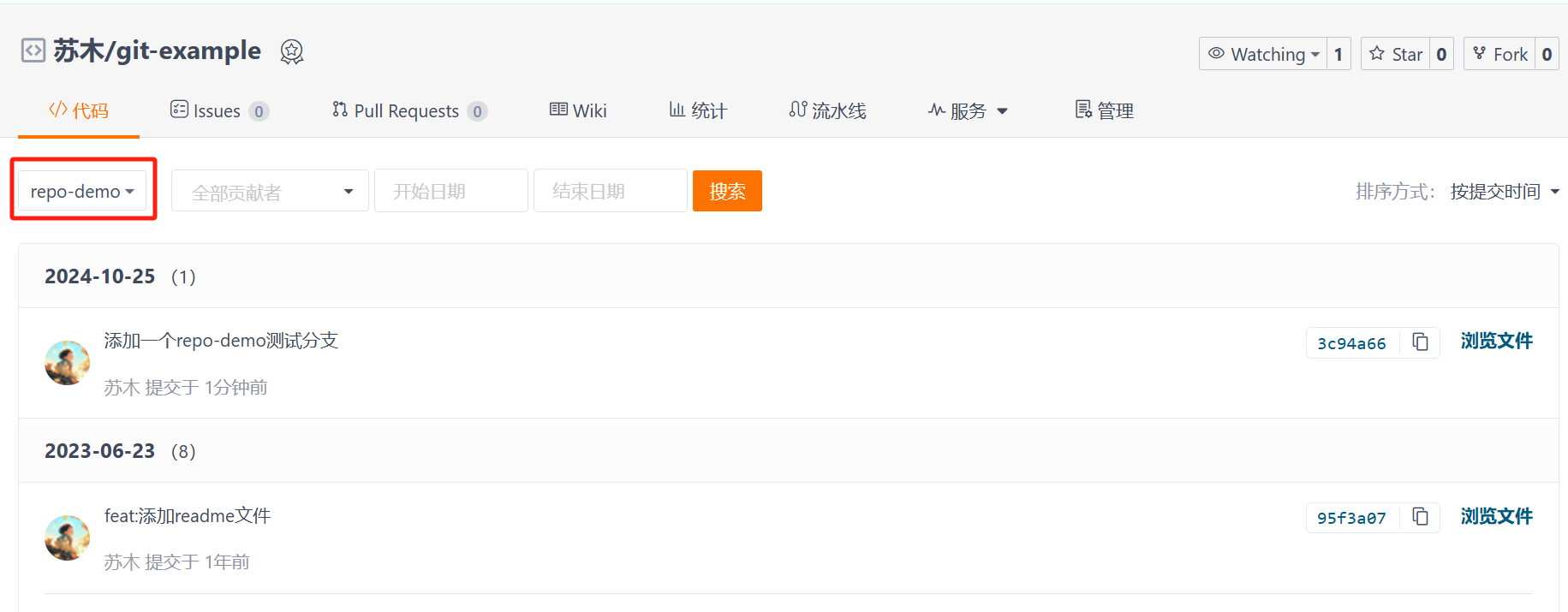
我们在之前的 gitee 仓库中多创建一个测试分支:
2. 清单文件
当我们想要拉取指定分支的时候,其实还是使用 revision 属性:
<project path="git-example-local" name="git-example" dest-branch="repo-demo" />在 repo 仓库的文档中是这样说的:
Attribute
revision: Name of the Git branch the manifest wants to track for this project. Names can be relative to refs/heads (e.g. just "master") or absolute (e.g. "refs/heads/master"). Tags and/or explicit SHA-1s should work in theory, but have not been extensively tested. If not supplied the revision given by the remote element is used if applicable, else the default element is used.属性
revision:清单文件希望为此项目跟踪的 Git 分支名称。名称可以是相对于 refs/heads 的(例如,仅“master”),也可以是绝对的(例如,“refs/heads/master”)。从理论上讲,标签和/或明确的 SHA-1 应该可行,但尚未经过广泛测试。如果未提供,则在适用情况下使用远程元素给出的版本,否则使用默认元素。Attribute
dest-branch: Name of a Git branch (e.g.master). When usingrepo upload, changes will be submitted for code review on this branch. If unspecified both here and in the default element,revisionis used instead.属性
dest-branch:Git 分支的名称(例如master)。使用repo upload时,更改将提交到此分支进行代码审查。如果在此处和默认元素中均未指定,则改用revision。
这里为了测试,我写了两个测试文件
但是呢,后面实践过就会发现,dest-branch 不是用来控制代码拉取的分支,它其实专门用于 代码提交和代码评审 流程的,不过这个流程我就没有去尝试了。
3. 初始化
mkdir test1 test2

cd test1
repo init --repo-url=https://mirrors.tuna.tsinghua.edu.cn/git/git-repo --repo-rev= -u https://gitee.com/sumumm/repo-manifest-demo.git -b master -m 07-dest-branch/repo-demo.xml

cd test2
repo init --repo-url=https://mirrors.tuna.tsinghua.edu.cn/git/git-repo --repo-rev= -u https://gitee.com/sumumm/repo-manifest-demo.git -b master -m 08-reveision-branch/repo-demo.xml4. 同步项目
repo sync5. 查看提交记录
sumu@sumu-vm:~/workspace/test1/git-example-local$ git mylog
* [qidaink] 95f3a07 : feat:添加readme文件  (HEAD, origin/master, m/master) (2023-06-23 14:47:53)
*   [qidaink] 9d04b8f : feat:C6 合并iss53(冲突已解决)  (2023-06-23 11:12:50)
|\
| * [qidaink] 684f9e8 : feat:C5 结束BUG的修复[issue 53]  (origin/iss53) (2023-06-23 10:36:42)
| * [qidaink] 2f0500f : feat:C3 修复C1出现的BUG[issue 53]  (2023-06-23 09:23:52)
* | [qidaink] f5a3adf : feat:C4 修复紧急问题  (tag: V2023_06_23_10_06_53-release, origin/hotfix) (2023-06-23 10:06:53)
|/
* [qidaink] 08ec435 : feat:C2功能开发  (2023-06-23 08:57:24)
* [qidaink] 65b2acb : feat:C1功能开发  (2023-06-23 08:56:56)
* [qidaink] 859b8ea : feat:C0功能开发 (2023-06-23 08:56:15)会发现这里用的还是 master 分支,这里并没有拉取到 repo-demo 分支,所以这个属性对于指定拉取的分支是无效的。
sumu@sumu-vm:~/workspace/test2/git-example-local$ git mylog
* [sumu] 3c94a66 : 添加一个repo-demo测试分支  (HEAD, origin/repo-demo, m/master) (2024-10-25 06:56:51)
* [qidaink] 95f3a07 : feat:添加readme文件  (origin/master) (2023-06-23 14:47:53)
*   [qidaink] 9d04b8f : feat:C6 合并iss53(冲突已解决)  (2023-06-23 11:12:50)
|\
| * [qidaink] 684f9e8 : feat:C5 结束BUG的修复[issue 53]  (origin/iss53) (2023-06-23 10:36:42)
| * [qidaink] 2f0500f : feat:C3 修复C1出现的BUG[issue 53]  (2023-06-23 09:23:52)
* | [qidaink] f5a3adf : feat:C4 修复紧急问题  (tag: V2023_06_23_10_06_53-release, origin/hotfix) (2023-06-23 10:06:53)
|/
* [qidaink] 08ec435 : feat:C2功能开发  (2023-06-23 08:57:24)
* [qidaink] 65b2acb : feat:C1功能开发  (2023-06-23 08:56:56)
* [qidaink] 859b8ea : feat:C0功能开发 (2023-06-23 08:56:15)就会看到这里其实获取的已经是 repo-demo 分支的了:
六、指定 tag
1. 创建一个 tag
我们还是以这个仓库为例 git-example:
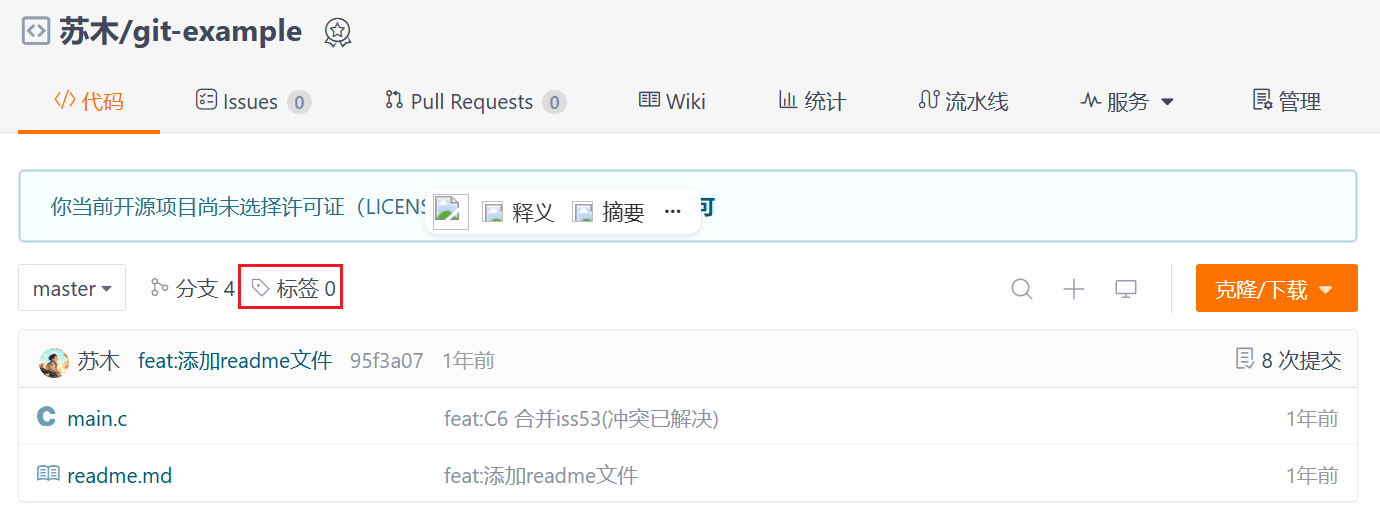
这里我们在这个仓库创建一个 tag:
git clone git@gitee.com:sumumm/git-example.git
cd git-example
git mylog我们在这里创建一个 tag:
git tag V2023_06_23_10_06_53-release f5a3adf然后推送到远程仓库:
git push origin --tags # 推送所有的 tags然后我们看一下 gitee 仓库:

2. 清单库
指定 tag 的时候,也是通过 project 的 revision 属性,使用 tag 的时候不能直接写 tag 名(直接写的话,在 repo sync 的时候会报错),要加上 refs/tags/:
<project path="git-example-local" name="git-example" revision="refs/tags/V2023_06_23_10_06_53-release"/>清单库可以看这里:09-tag/repo-demo.xml
Attribute
revision: Name of the Git branch the manifest wants to track for this project. Names can be relative to refs/heads (e.g. just "master") or absolute (e.g. "refs/heads/master"). Tags and/or explicit SHA-1s should work in theory, but have not been extensively tested. If not supplied the revision given by the remote element is used if applicable, else the default element is used.属性
revision:清单文件希望跟踪的该项目的 Git 分支名称。名称可以是相对于 refs/heads 的(例如,仅“master”),也可以是绝对的(例如,“refs/heads/master”)。从理论上讲,标签和/或明确的 SHA-1 应该有效,但尚未经过广泛测试。如果未提供,则在适用的情况下使用远程元素给出的版本,否则使用默认元素。
3. 初始化
repo init --repo-url=https://mirrors.tuna.tsinghua.edu.cn/git/git-repo --repo-rev= -u https://gitee.com/sumumm/repo-manifest-demo.git -b master -m 09-tag/repo-demo.xml4. 同步项目
repo sync5. 看一下提交记录
我们看一下 git-example-local 的提交记录:
sumu@sumu-vm:~/workspace/test/git-example-local$ git mylog
* [qidaink] f5a3adf : feat:C4 修复紧急问题  (HEAD, tag: V2023_06_23_10_06_53-release, origin/hotfix, m/master) (2023-06-23 10:06:53)
* [qidaink] 08ec435 : feat:C2功能开发  (2023-06-23 08:57:24)
* [qidaink] 65b2acb : feat:C1功能开发  (2023-06-23 08:56:56)
* [qidaink] 859b8ea : feat:C0功能开发 (2023-06-23 08:56:15)会发现就处于 f5a3adf 这次提交啦。
七、指定 clone 的深度
1. 准备一个仓库
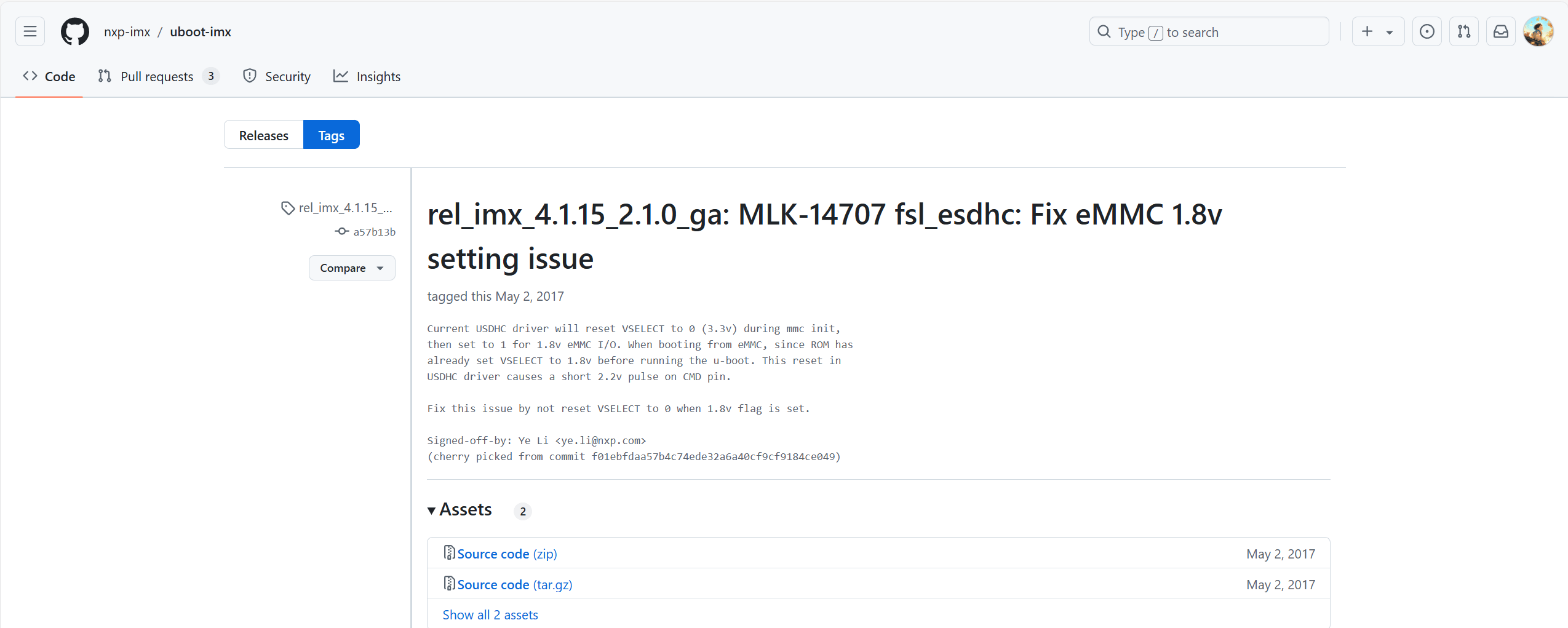
对于有一个仓库,比如我后面会学习的 uboot:nxp-imx/uboot-imx at rel_imx_4.1.15_2.1.0_ga (github.com)

这样我们完全 clone 下来的话会很占地,而且会 clone 很久,我们手动使用 git clone 的时候,有一个 --depth 选项可以用,repo 中也是支持的。我们这里还需要指定 tag,固定一下版本:Release rel_imx_4.1.15_2.1.0_ga: MLK-14707 fsl_esdhc: Fix eMMC 1.8v setting issue · nxp-imx/uboot-imx (github.com):
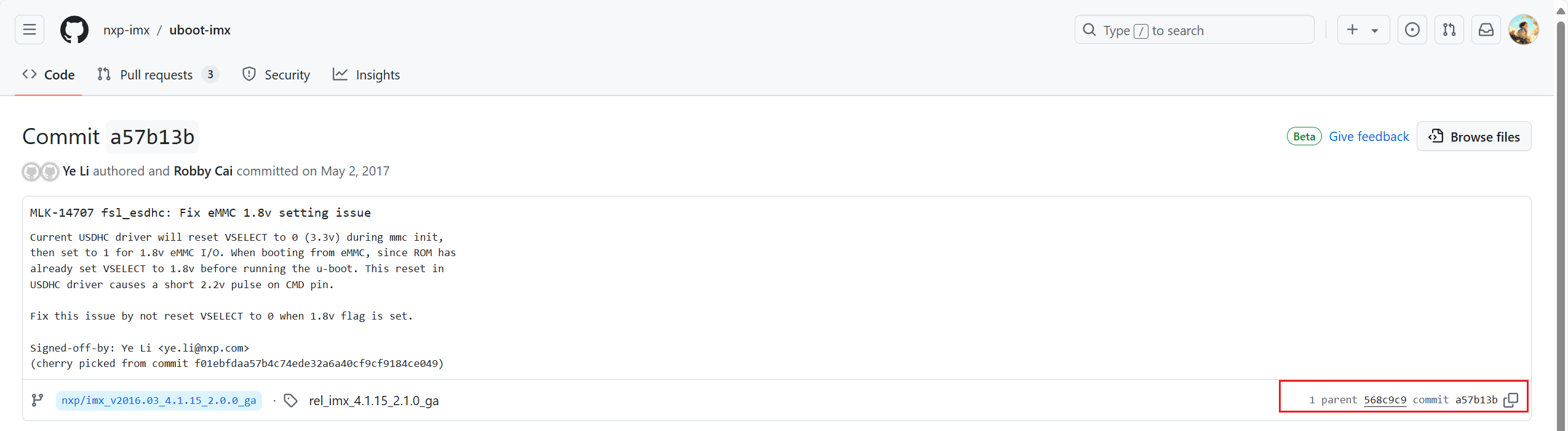
然后根据标签找到提交记录,后面验证版本用:
2. 清单库
指定clone深度的方式如下所示:
<project path="uboot" name="uboot-imx" remote="nxp-imx" revision="ref/tags/rel_imx_4.1.15_2.1.0_ga" clone-depth="1" />清单库可以看这里:10-clone-depth/repo-demo.xml
3. 初始化
repo init --repo-url=https://mirrors.tuna.tsinghua.edu.cn/git/git-repo --repo-rev= -u https://gitee.com/sumumm/repo-manifest-demo.git -b master -m 10-clone-depth/repo-demo.xml4. 同步项目
repo sync如果网络不好的话可以选择使用CNB,然后吧ssh链接都改成https。
5. 查看 uboot 的提交记录
sumu@sumu-vm:~/workspace/test/uboot$ git log
commit a57b13b942d59719e3621179e98bd8a0ab235088 (grafted, HEAD, tag: rel_imx_4.1.15_2.1.0_ga, m/master)
Author: Ye Li <ye.li@nxp.com>
Date:   Thu Apr 20 10:16:24 2017 +0800

    MLK-14707 fsl_esdhc: Fix eMMC 1.8v setting issue

    Current USDHC driver will reset VSELECT to 0 (3.3v) during mmc init,
    then set to 1 for 1.8v eMMC I/O. When booting from eMMC, since ROM has
    already set VSELECT to 1.8v before running the u-boot. This reset in
    USDHC driver causes a short 2.2v pulse on CMD pin.

    Fix this issue by not reset VSELECT to 0 when 1.8v flag is set.

    Signed-off-by: Ye Li <ye.li@nxp.com>
(cherry picked from commit f01ebfdaa57b4c74ede32a6a40cf9cf9184ce049)会发现只有一次提交,就是我们上面 tag 对应的 a57b13b942d59719e3621179e98bd8a0ab235088。
八、创建软链接
1. 清单文件
创建软链接的方式如下所示:
<!-- 项目定义
      path: 项目在本地工作区中的相对路径
      name: 项目的仓库名称,会与remote的fetch地址拼接形成完整克隆地址
      完整克隆地址示例:https://gitee.com/sumumm/git-example.git -->
  <!-- https://github.com/nxp-imx/uboot-imx/releases/tag/rel_imx_4.1.15_2.1.0_ga -->
  <project path="uboot" name="uboot-imx" remote="nxp-imx" revision="refs/tags/rel_imx_4.1.15_2.1.0_ga" clone-depth="1">
    <!-- linkfile: 创建符号链接
         src: 源文件路径(相对于项目路径path)
         dest: 目标文件路径(相对于本地工作区根目录) -->
    <linkfile src="Makefile" dest="uboot-Makefile"/>
</project>这里src是源文件的路径,它是相对于项目路径path的,而dest是目标文件路径,也就是创建的软链接的路径,它是相对于.repo所在目录的路径。
清单库可以看这里:11-linkfile/repo-demo.xml
2. 初始化
repo init --repo-url=https://mirrors.tuna.tsinghua.edu.cn/git/git-repo --repo-rev= -u https://gitee.com/sumumm/repo-manifest-demo.git -b master -m 11-linkfile/repo-demo.xml3. 同步项目
repo sync如果网络不好的话可以选择使用CNB,然后吧ssh链接都改成https。
4. 查看链接文件
当同步完项目,我们可以看到如下目录结构:
➜  test ls -alh
total 12K
drwxr-xr-x  7 root root  146 Jan 24 11:29 .
drwx------  1 root root 4.0K Jan 24 11:30 ..
drwxr-xr-x  7 root root  291 Jan 24 11:29 .repo
drwxr-xr-x  2 root root   44 Jan 24 11:29 git-example-local
drwxr-xr-x  3 root root   87 Jan 24 11:29 openssl-local
drwxr-xr-x  8 root root 4.0K Jan 24 11:29 repo-local
drwxr-xr-x 22 root root 4.0K Jan 24 11:29 uboot
lrwxrwxrwx 1 root root 14 Jan 24 11:29 uboot-Makefile -> uboot/Makefile可以看到uboot-Makefile是一个软链接,指向了uboot/Makefile文件,且这个uboot-Makefile软链接和.repo位于同一目录。